背景
项目链接:https://github.com/rusthx/MingDeng
MingDeng是一个Tauri桌面+HTML/CSS/JS原生前端+Python后端的桌面应用,是一个跨平台的agentic todo,用agent来辅助学习。
现在原始项目还没引入workflow,手动在 Windows / macOS / Linux 上分别编译、打包、上传 Release 太耗时易错。
正好我练练GitHub Action自动打包安装包。希望做到git推标签自动触发,版本一致性检查,多平台构建并创建GitHub Release草稿。
设计思路
触发条件:仅当推送 v* 格式的标签(如 v1.0.0)时运行,推 main 分支不触发(生产规范)。
前期测试时可以修改触发条件为提交到main分支就触发。
1
2
3
4
5
6
|
on:
  push:
    tags:
      - 'v*' # git推送带tag的标签时触发
    branches: [ main ] # git提交到main分支就触发,生产环境删除此行
  workflow_dispatch:
|
版本一致性校验:package.json / Cargo.toml / tauri.conf.json 中的版本号必须与标签相同
多平台策略:
- macOS:构建通用二进制(universal-apple-darwin)
- Windows:使用嵌入式 Python 发行版(避免安装完整 Python)
- Linux:依赖系统库(libwebkit2gtk 等)
缓存优化:Python 虚拟环境/嵌入式Python的缓存,Rust依赖缓存。前期测试的时候没引入缓存,打包一次需要十几分钟,引入缓存后一次打包只需要7分钟左右。虽然还是比较慢,但是打包时间确实降低了36%。
发布方式:Tauri Action自动生成.exe/.dmg/.AppImage,创建Draft Release(release草稿)。
Workflow解析
触发与权限
 1
 2
 3
 4
 5
 6
 7
 8
 9
10
|
name: Publish Release

on:
  push:
    tags:
      - 'v*'
  workflow_dispatch: # 支持手动触发

permissions:
  contents: write
|
版本一致性检查check-version
提取标签(tag发布)或package.json中的版本号,
依次比对package.json、Cargo.toml、tauri.conf.json三个文件的 version 字段,
如果不一致,报错并终止流程。
package.json是前端(Node.js)项目的配置文件,管理前端代码和Tauri 的 npm CLI 工具。
npm run tauri dev / build 依赖此文件。
版本号用于标识整个应用(与 Rust 后端保持一致)。jq -r .version package.json
Cargo.toml是Rust项目的包管理文件,定义Rust 后端的版本和依赖。
控制 Tauri 应用的核心逻辑(系统调用、文件访问、窗口管理)。
版本号与前端保持一致,用于生成最终可执行文件的元信息。grep -m1 '^version' src-tauri/Cargo.toml | awk -F '"' '{print $2}'
tauri.conf.json是Tauri 框架的专属配置文件,桥接前端和Rust:告诉Tauri去哪里找前端资源、如何配置应用窗口。
定义打包行为(macOS 的 .dmg、Windows 的 .exe 等)。
它是最终用户看到的版本号。jq -r .version src-tauri/tauri.conf.json
 1
 2
 3
 4
 5
 6
 7
 8
 9
10
11
12
13
14
15
16
17
18
19
20
21
22
23
24
25
26
27
28
29
30
31
32
33
34
35
36
37
38
39
40
|
  check-version:
    name: Check Version Consistency
    runs-on: ubuntu-24.04
    outputs:
      version: ${{ steps.version.outputs.version }}
    steps:
      - uses: actions/checkout@v6

      - name: Extract version from Tag or package.json
        id: version
        run: |
          if [[ "$GITHUB_REF" == refs/tags/v* ]]; then
            echo "version=${GITHUB_REF#refs/tags/v}" >> $GITHUB_OUTPUT
          else
            echo "version=$(jq -r .version package.json)" >> $GITHUB_OUTPUT
          fi

      - name: Check package.json
        run: |
          PKG_VER=$(jq -r .version package.json)
          if [ "$PKG_VER" != "${{ steps.version.outputs.version }}" ]; then
            echo "::error::package.json version ($PKG_VER) does not match tag version (${{ steps.version.outputs.version }})"
            exit 1
          fi

      - name: Check Cargo.toml
        run: |
          CARGO_VER=$(grep -m1 '^version' src-tauri/Cargo.toml | awk -F '"' '{print $2}')
          if [ "$CARGO_VER" != "${{ steps.version.outputs.version }}" ]; then
            echo "::error::Cargo.toml version ($CARGO_VER) does not match tag version (${{ steps.version.outputs.version }})"
            exit 1
          fi

      - name: Check tauri.conf.json
        run: |
          TAURI_VER=$(jq -r .version src-tauri/tauri.conf.json)
          if [ "$TAURI_VER" != "${{ steps.version.outputs.version }}" ]; then
            echo "::error::tauri.conf.json version ($TAURI_VER) does not match tag version (${{ steps.version.outputs.version }})"
            exit 1
          fi
|
多平台构建与发布
使用矩阵策略在不同的平台打包。
1
2
3
4
5
6
7
8
|
matrix:
  include:
    - platform: macos-latest
      args: '--target universal-apple-darwin'
    - platform: ubuntu-24.04
      args: ''
    - platform: windows-latest
      args: ''
|
MingDeng项目本意是在Windows/MacOS/Ubuntu创建python虚拟环境venv,然后在venv里下载依赖包。
但是在Window上由于Windows出厂不带python,如果用的是Anaconda环境又无法检查到python,只好使用嵌入的离线python包。
curl -L -o python-embed.zip "https://www.python.org/ftp/python/${PYTHON_VERSION}/python-${PYTHON_VERSION}-embed-amd64.zip"
macOS或者Linux平台:直接创建 venv,缓存整个目录。不过我只测试了Windows平台的软件,另外两个平台打包的安装包可能也有bug。
ubuntu平台可能会少一些依赖,把缺少的依赖也一起打包进来。
1
2
3
4
5
|
- name: Install dependencies (Ubuntu only)
  if: matrix.platform == 'ubuntu-24.04'
  run: |
        sudo apt-get update
        sudo apt-get install -y --no-install-recommends libgtk-3-dev libwebkit2gtk-4.1-dev libappindicator3-dev librsvg2-dev patchelf
|
最后再把前端依赖也打包进来:
1
2
|
- name: Install frontend dependencies
    run: npm install
|
Tauri Action 构建与发布
复用tauri官方的发布release的action。
1
2
3
4
5
6
|
- uses: tauri-apps/tauri-action@v0
  with:
    tagName: ${{ github.ref_name }}
    releaseName: 'MingDeng v__VERSION__'
    releaseDraft: true          # 草稿模式,可人工检查后再发布
    args: ${{ matrix.args }}
|
完成打包
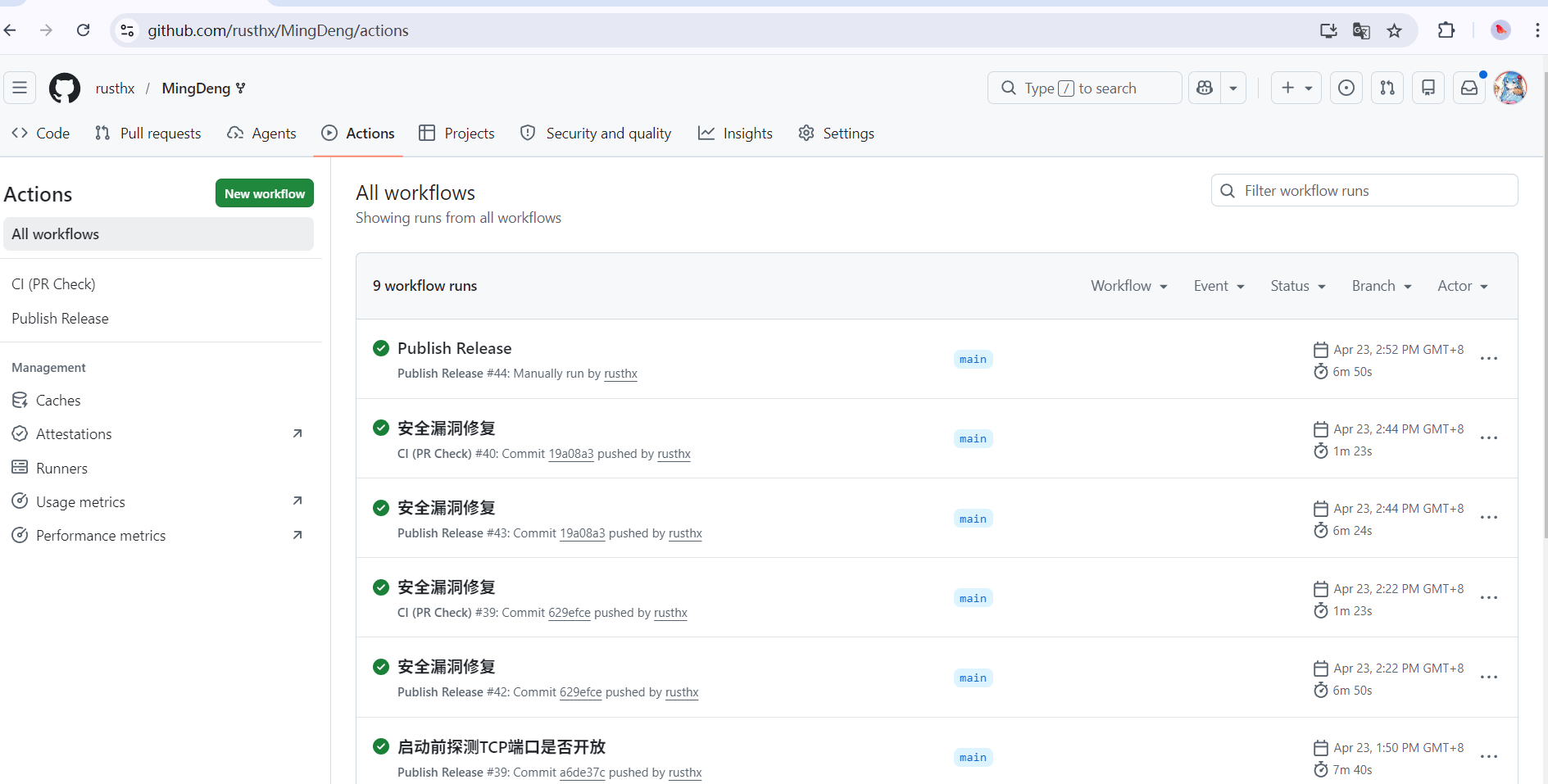
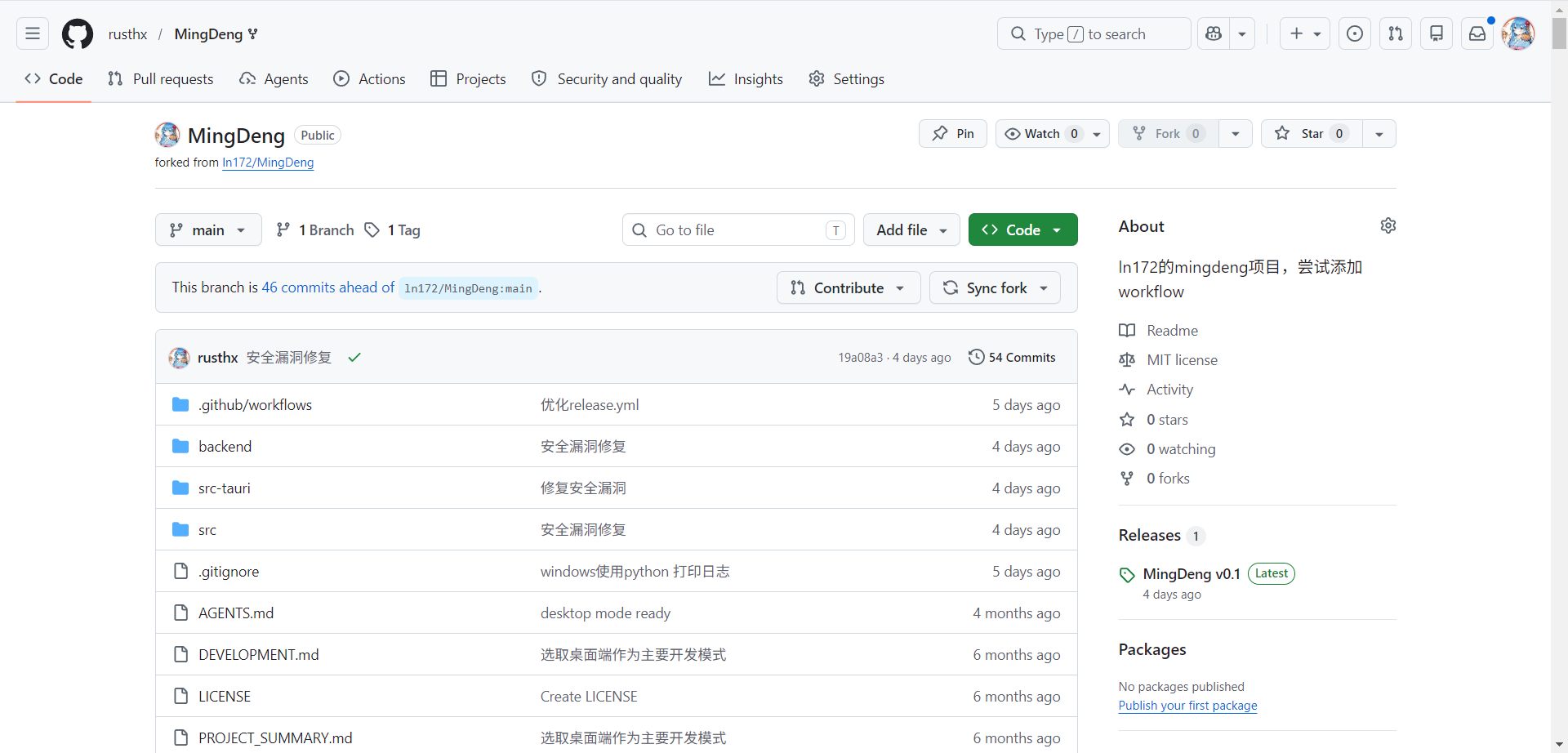
作个简单总结,虽然是练手的项目,但是做的还是挺认真的:
- 原项目没有日志打印,导致遇见问题极难排查
- 原项目代码里没考虑到使用代理的情况,导致开启代理后前端没法与后端通信
- 打包安装包一定一定要引入缓存,不然等待workflow完成的时间真的很痛苦,尤其是想快速debug的时候
- 跨平台不好做。原作者希望安装包控制在5M以内,极致轻量化,但是Windows上使用python就至少要有一个python安装包,打包后安装包都有四十多MB了。安装后的文件夹直接一百多MB,即使是MacOS平台或者Ubuntu平台为了兼容性,也需要打包一些依赖进去,最后的安装包也还是有四五十MB。
- 良好的日志打印非常重要。由于1,导致中间修改代码的时候不管怎么改都只显示failed to fetch,排查不出原因,急得团团转。
后来添加了更全更细的日志信息打印,引入网页dev工具,才终于排查出问题所在。
完整release.yml附件
  1
  2
  3
  4
  5
  6
  7
  8
  9
 10
 11
 12
 13
 14
 15
 16
 17
 18
 19
 20
 21
 22
 23
 24
 25
 26
 27
 28
 29
 30
 31
 32
 33
 34
 35
 36
 37
 38
 39
 40
 41
 42
 43
 44
 45
 46
 47
 48
 49
 50
 51
 52
 53
 54
 55
 56
 57
 58
 59
 60
 61
 62
 63
 64
 65
 66
 67
 68
 69
 70
 71
 72
 73
 74
 75
 76
 77
 78
 79
 80
 81
 82
 83
 84
 85
 86
 87
 88
 89
 90
 91
 92
 93
 94
 95
 96
 97
 98
 99
100
101
102
103
104
105
106
107
108
109
110
111
112
113
114
115
116
117
118
119
120
121
122
123
124
125
126
127
128
129
130
131
132
133
134
135
136
137
138
139
140
141
142
143
144
145
146
147
148
149
150
151
152
153
154
155
156
157
158
159
160
161
162
163
164
|
name: Publish Release

on:
  push:
    tags:
      - 'v*'
  workflow_dispatch: # 支持在GitHub仓库的action页面点击执行

permissions:
  contents: write

env:
  CARGO_TERM_COLOR: always

jobs:
  check-version:
    name: Check Version Consistency
    runs-on: ubuntu-24.04
    outputs:
      version: ${{ steps.version.outputs.version }}
    steps:
      - uses: actions/checkout@v6

      - name: Extract version from Tag or package.json
        id: version
        run: |
          if [[ "$GITHUB_REF" == refs/tags/v* ]]; then
            echo "version=${GITHUB_REF#refs/tags/v}" >> $GITHUB_OUTPUT
          else
            echo "version=$(jq -r .version package.json)" >> $GITHUB_OUTPUT
          fi

      - name: Check package.json
        run: |
          PKG_VER=$(jq -r .version package.json)
          if [ "$PKG_VER" != "${{ steps.version.outputs.version }}" ]; then
            echo "::error::package.json version ($PKG_VER) does not match tag version (${{ steps.version.outputs.version }})"
            exit 1
          fi

      - name: Check Cargo.toml
        run: |
          CARGO_VER=$(grep -m1 '^version' src-tauri/Cargo.toml | awk -F '"' '{print $2}')
          if [ "$CARGO_VER" != "${{ steps.version.outputs.version }}" ]; then
            echo "::error::Cargo.toml version ($CARGO_VER) does not match tag version (${{ steps.version.outputs.version }})"
            exit 1
          fi

      - name: Check tauri.conf.json
        run: |
          TAURI_VER=$(jq -r .version src-tauri/tauri.conf.json)
          if [ "$TAURI_VER" != "${{ steps.version.outputs.version }}" ]; then
            echo "::error::tauri.conf.json version ($TAURI_VER) does not match tag version (${{ steps.version.outputs.version }})"
            exit 1
          fi

  release:
    name: Build and Release
    needs: check-version
    strategy:
      fail-fast: false
      matrix:
        include:
          - platform: macos-latest
            args: '--target universal-apple-darwin'
          - platform: ubuntu-24.04
            args: ''
          - platform: windows-latest
            args: ''
    runs-on: ${{ matrix.platform }}

    steps:
      - uses: actions/checkout@v6

      - name: Setup Node
        uses: actions/setup-node@v6
        with:
          node-version: 20
          cache: 'npm'

      # --- 缓存 & 准备 Python 运行时 ---
      - name: Cache Windows embedded Python
        if: matrix.platform == 'windows-latest'
        uses: actions/cache@v4
        id: cache-python
        with:
          path: backend-venv
          key: windows-python-embed-3.11.9-${{ hashFiles('backend/requirements.txt') }}

      - name: Prepare Python runtime (Windows)
        if: matrix.platform == 'windows-latest' && steps.cache-python.outputs.cache-hit != 'true'
        shell: bash
        run: |
          PYTHON_VERSION="3.11.9"
          EMBED_DIR="backend-venv"

          echo "=== 下载 Python 嵌入式发行版 ==="
          curl -L -o python-embed.zip \
            "https://www.python.org/ftp/python/${PYTHON_VERSION}/python-${PYTHON_VERSION}-embed-amd64.zip"

          echo "=== 解压 ==="
          mkdir -p "$EMBED_DIR"
          powershell -Command "Expand-Archive -Path python-embed.zip -DestinationPath $EMBED_DIR -Force"
          rm python-embed.zip

          echo "=== 启用 site-packages ==="
          sed -i 's/^#import site/import site/' "$EMBED_DIR"/python*._pth

          echo "=== 安装 pip ==="
          curl -L -o "$EMBED_DIR/get-pip.py" https://bootstrap.pypa.io/get-pip.py
          "$EMBED_DIR/python.exe" "$EMBED_DIR/get-pip.py"
          rm "$EMBED_DIR/get-pip.py"

          echo "=== 安装后端依赖 ==="
          "$EMBED_DIR/python.exe" -m pip install -r backend/requirements.txt

      - name: Cache Python venv (macOS/Linux)
        if: matrix.platform != 'windows-latest'
        uses: actions/cache@v4
        id: cache-venv
        with:
          path: backend-venv
          key: ${{ matrix.platform }}-venv-3.11-${{ hashFiles('backend/requirements.txt') }}

      - name: Prepare Python runtime (macOS/Linux)
        if: matrix.platform != 'windows-latest' && steps.cache-venv.outputs.cache-hit != 'true'
        shell: bash
        run: |
          python3 -m venv backend-venv
          ./backend-venv/bin/pip install --upgrade pip
          ./backend-venv/bin/pip install -r backend/requirements.txt

      # --- Rust ---
      - name: Install Rust stable
        uses: dtolnay/rust-toolchain@v1
        with:
          toolchain: stable
          targets: aarch64-apple-darwin,x86_64-apple-darwin

      - uses: Swatinem/rust-cache@v2
        with:
          workspaces: src-tauri
          key: ${{ matrix.platform }}

      - name: Install dependencies (Ubuntu only)
        if: matrix.platform == 'ubuntu-24.04'
        run: |
          sudo apt-get update
          sudo apt-get install -y --no-install-recommends libgtk-3-dev libwebkit2gtk-4.1-dev libappindicator3-dev librsvg2-dev patchelf

      - name: Install frontend dependencies
        run: npm install

      - name: Build and Release with Tauri Action
        uses: tauri-apps/tauri-action@v0
        env:
          GITHUB_TOKEN: ${{ secrets.GITHUB_TOKEN }}
        with:
          tagName: ${{ github.ref_name }}
          releaseName: 'MingDeng v__VERSION__'
          releaseBody: 'See the assets to download and install this version.'
          releaseDraft: true
          prerelease: false
          args: ${{ matrix.args }}
|